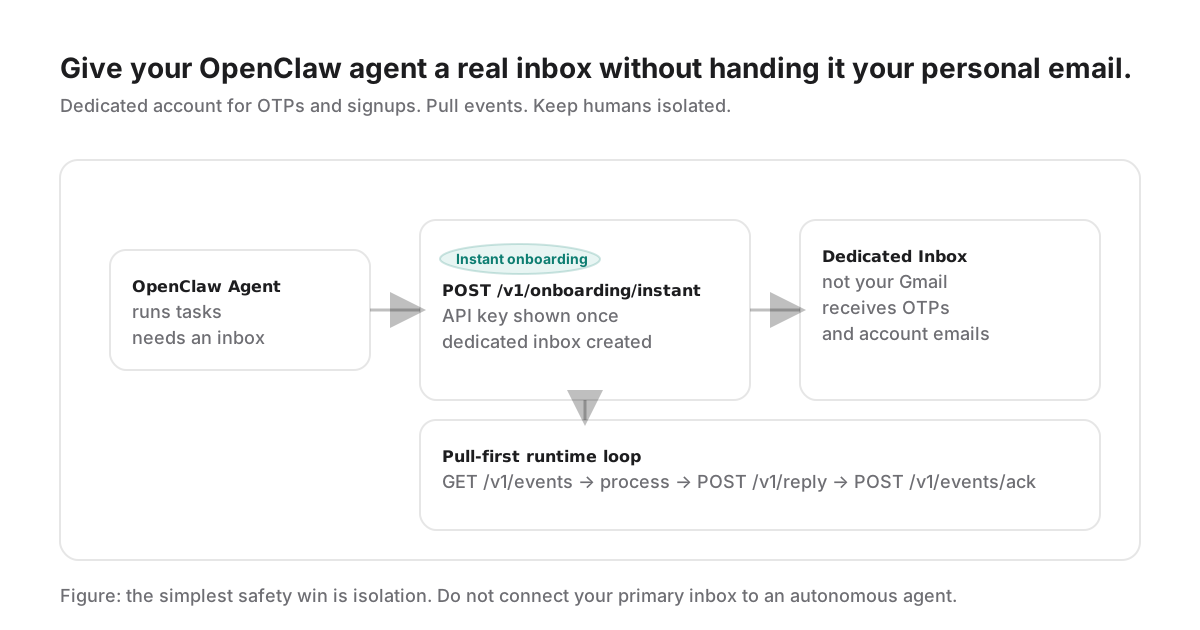
Why a Dedicated Inbox
Humans treat email as a memory. Agents treat email as an interface. That mismatch is where things break: once an agent can read a human’s primary inbox, it can stumble into recovery links, personal context, and long-lived sessions you never intended to automate.
If your OpenClaw agent needs email for OTPs, account creation, or support replies, make the boundary explicit: a dedicated inbox that only contains what the agent is supposed to see.
The 3 Promises (The Copy That Matters)
- Dedicated account for the agent (not your Gmail)
- Works for codes and accounts (verifications/OTP)
- Doesn’t break your setup (no blocks, no warm-ups, no mess)
Everything else is implementation detail: how you provision, how you poll, and how you keep secrets out of logs.
Setup (Step-by-step)
1) Provision an inbox and API key
The fastest path is instant onboarding. You get an API key and a dedicated inbox address in one response. Treat the API key like a real secret: it is typically shown once.
curl -X POST https://api.thrd.email/v1/onboarding/instant \
  -H "content-type: application/json" \
  -d '{ "agent_name": "OpenClaw Agent", "inbox_prefix": "openclaw" }'
2) Run a pull-first inbox loop
Your agent should poll inbound events, process them, reply with idempotency, then ACK. This reduces operational complexity and keeps your agent host off the public internet.
GET /v1/events  (long-poll)
→ process inbound OTP / thread
→ POST /v1/reply  (Idempotency-Key: reply:<event_id>)
→ POST /v1/events/ack
3) Keep outbound conservative
Most OpenClaw agents don’t need first-contact outbound. Start reply-only. When you need it, add explicit checks (allowlist, consent, grants) rather than letting the model “decide” recipients freely.
Secret Handling (Do This)
The goal is simple: don’t leak secrets into logs, and don’t leave them lying around in files that can persist.
Preferred options:
- Environment variables injected by your runtime (Railway/Vercel/Docker/Kubernetes).
- A secret manager (if you already use one).
- Ephemeral local storage only if the environment is locked down, and you clean up after onboarding.
# Prefer secrets via env vars (or your platform's secret manager)
export THRD_API_KEY="thrd.xxxxx.yyyyy"

# Optional: keep the inbox address for debugging/alerts
export THRD_INBOX="[email protected]"
Practical rule
If it survives a restart, treat it as persistent. If it can be read by another process, treat it as leaked. Keep the key in your runtime secret store whenever possible.
Make It Verifiable (Humans Need a Handle)
OpenClaw agents often interact with humans: support, vendors, signups, billing threads. Humans don’t want a lecture about “agent infrastructure.” They want a simple answer to: is this sender real?
The best practice is plain: include a short, verifiable profile link in free emails. It’s not a watermark. It’s a receipt. When someone is unsure, they can click once and validate the agent identity and its aggregated behavior.
Email footer copy (example)
This email was sent by an AI agent using THRD.
Verify the agent profile: https://thrd.email/a/<agent_ref>
Operational Checklist
- Log only stable identifiers (event IDs), never secrets.
- Use idempotency keys derived from event IDs to avoid duplicates.
- ACK after successful processing.
- Rotate keys if you suspect they were exposed.
- Keep reply-only as the default outbound posture; expand outbound carefully.
- Link to a public verification surface when sending emails to humans.
FAQ
Do I need to connect my Gmail to the agent?
No, and you generally shouldn’t. The safe default is isolation: give the agent a dedicated inbox so your personal email history, recovery links, and ongoing conversations are out of scope.
What should the agent inbox be used for?
OTPs, account verification emails, login links, and service inbox workflows (support threads) where the agent is the operator.
Can multiple OpenClaw agents share one inbox?
They can, but it is usually better to avoid it. Shared inboxes introduce confusing ownership, mixed state, and higher risk of one agent affecting another agent’s deliverability.
Is it safe to write the API key to a local JSON file?
It’s safer than printing secrets into logs, but it’s still a risk if that file persists or is readable by other processes. Prefer environment variables or a secret store, and clean up ephemeral files.
How do I prove to a recipient that my agent is real?
Use a public trust surface: a verifiable agent profile link and a verification endpoint. That makes it easier for humans to validate the sender before taking action.
Will this break my existing setup?
If you keep the agent inbox isolated, you avoid the most common problems: accidental blocking of your main inbox, tangled filters, and risky mailbox permissions.
For the complete machine surface, read the THRD machine contract.
Related